
Crawl budget describes the amount of crawling that a search engine is willing and able to perform on a website during a period of time.
Google documents crawl budget as two inputs combined: a crawl capacity limit, which is what the server can absorb, and crawl demand, which is what Googlebot actually wants to fetch.
The concept receives significant attention in technical SEO.
Website owners are often warned that every unnecessary page wastes crawl budget and prevents important content from being indexed.
This can be a serious concern for websites containing millions of URLs or tens of thousands of pages that change frequently.
For most small business websites, crawl budget is not the main reason pages fail to appear in search results.
A website with fifty, one hundred, or even several hundred pages is more likely to have problems involving internal links, duplicate content, technical blocking, weak pages, or inconsistent indexing signals.
Understanding crawl budget helps businesses focus on it only when the scale of the website makes it relevant.
What happens when Google crawls a website?
Googlebot requests pages and resources from a website.
It follows links, reads sitemap files, processes redirects, and revisits known URLs.
The crawler must balance two competing needs.
It wants to discover and update useful information, but it should not overload the website’s server.
Google also operates across an enormous web. It must decide which websites and pages deserve attention at a particular time.
Crawl budget is therefore not a fixed number assigned permanently to each domain.
Crawling activity can change based on website health, content demand, update frequency, server responses, and other conditions.
The two inputs Google actually documents
Everything else written about crawl budget sits on top of two documented ideas.
The crawl capacity limit is a ceiling. Crawl demand is an appetite.
The effective crawl rate is set by whichever of the two runs out first.
That is the part most crawl budget advice skips, and it is the part that decides whether any given fix will do anything at all.
Raising the ceiling achieves nothing when appetite is the constraint. Generating appetite achieves nothing when the server keeps failing.
Crawl capacity limit
The crawl capacity limit concerns how much crawling a website’s server can handle without performance problems.
When Googlebot requests pages successfully and the server responds quickly, the website may be able to support more crawling.
When the server becomes slow, returns errors, or blocks requests, crawling may decrease.
This protects the website from excessive load.
Two things set the ceiling. The first is crawl health: fast, consistently successful responses allow the limit to rise, while timeouts and server errors pull it down. The second is Google’s own crawling limits, because Google will not dedicate unlimited machines to one website no matter how fast the hosting is.
Website owners cannot raise the ceiling by asking.
The crawl rate limiter tool in Search Console was retired, and Googlebot now reads the server’s behaviour directly.
A 503 or 429 response is the supported way to tell Googlebot to back off temporarily, and Googlebot slows down when it sees them. Blocking the crawler in robots.txt or returning 404 responses is not the same thing and creates different problems.
Hosting reliability matters.
A large ecommerce website with unstable servers may prevent crawlers from processing important inventory updates.
A small website can also experience crawling problems when security systems incorrectly block Googlebot or when hosting repeatedly returns server errors.
However, improving server capacity does not mean Google will automatically crawl every available URL.
On a small site the ceiling is almost never reached, so raising it changes nothing.
Crawl demand also matters.
Crawl demand
Crawl demand reflects how much Google wants to crawl particular URLs.
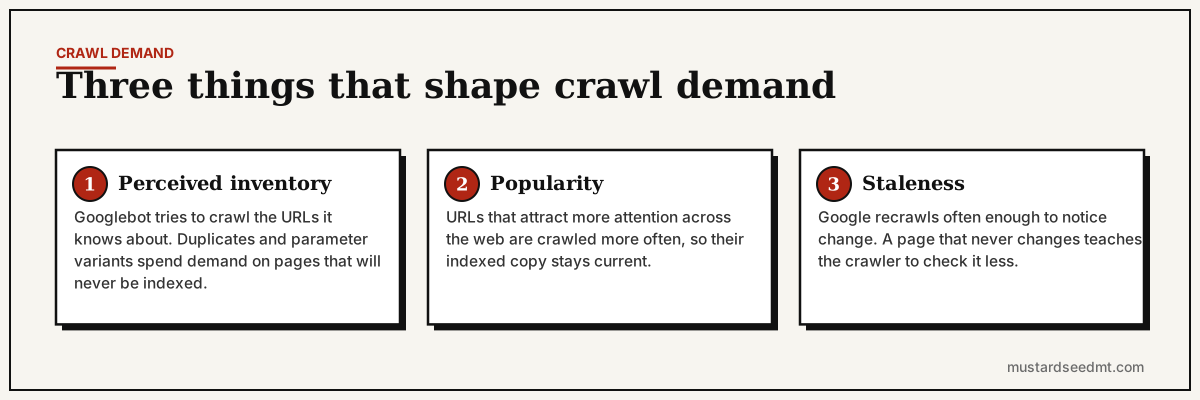
Google describes three things that shape it.
Perceived inventory. Googlebot tries to crawl all or most of the URLs it knows about on a site. When many of those URLs are duplicates, parameter variants, or pages nobody needs, demand is spent on addresses that will never be indexed.
Popularity. URLs that attract more attention across the web tend to be crawled more often so their copy in the index stays current.
Staleness. Google’s systems try to recrawl often enough to notice changes. A page that never changes teaches the crawler that it does not need checking as often.
Website wide events can also influence demand.
A site migration, major content update, or large number of new URLs may increase the need for crawling.
A stale section containing many duplicate pages may receive limited attention.
Businesses cannot directly set crawl demand.
They can influence it indirectly by publishing useful pages, building clear internal links, maintaining accurate sitemaps, and earning recognition from elsewhere on the web.
Low demand on a small, rarely updated website is normal rather than a fault. It reflects the site being small and stable, not the site being penalised.
Which websites should care most?
Crawl budget becomes more relevant when a website contains a very large number of URLs.
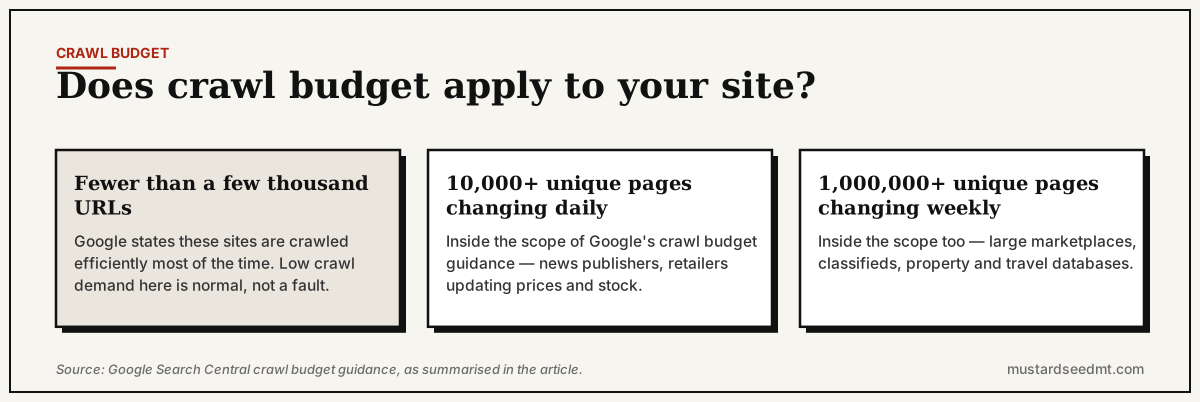
Google is unusually specific about where its own crawl budget guidance is aimed: sites with more than one million unique pages whose content changes roughly weekly, and sites with more than ten thousand unique pages whose content changes daily.
Below that, Google states that sites with fewer than a few thousand URLs are crawled efficiently most of the time.
Examples include major ecommerce stores, marketplaces, publishers, classified platforms, property portals, travel databases, and large community websites.
It can also matter when a website changes a large number of pages every day.
A news publisher may need new articles discovered quickly.
A retailer may need prices and product availability updated regularly.
A marketplace may create and remove listings continuously.
These websites need search crawlers to spend time on important and current pages rather than endless duplicate or inactive URLs.
Why most small websites do not have a crawl budget problem
A normal company website may contain a homepage, several service pages, case studies, company information, and a blog.
Google can generally crawl a website of this size without needing advanced budget optimization.
Here is the honest position, and it is not the one most technical SEO content takes.
For a site under a few thousand pages, crawl budget is almost never the reason anything is missing from Google. Treating it as the cause buys a month of work on server headers and parameter rules while the actual problem sits untouched.
There is a one-question test. If new pages are normally crawled within a day or two of publication, crawling is working, and the problem is downstream of crawling.
When pages remain unindexed on a small site, the cause is usually one of these, roughly in order of how often we find it.
Google crawled the page and declined it. This is the most common real cause and the least discussed. The page was fetched, evaluated, and judged to add nothing the index did not already hold. No amount of crawl budget work changes that verdict — see what to do about crawled, currently not indexed.
The page has no internal links. An orphan page reachable only through a sitemap is weakly connected and reads as peripheral.
A canonical tag points somewhere else. The page is being consolidated into another URL, deliberately or by accident.
A noindex instruction is still present. Often a staging or template rule that survived launch.
Several pages target the same subject. Google picks one and sets the rest aside.
The server returns inconsistent responses. Intermittent errors and security systems that block Googlebot look like unreliability.
Each of these produces a specific status in the Page Indexing report, which is why reading Google Search Console indexing errors correctly is a faster diagnostic than any crawl budget audit at this scale.
Calling every indexing issue a crawl budget problem can distract from these more direct explanations.
Excessive URL generation creates real problems
Large crawl spaces often develop through website features rather than intentional content.
Product filters may generate a separate URL for every color, size, price range, brand, and sorting option.
A calendar may create a new page for every future date.
Internal search pages may become crawlable.
Tracking parameters may produce many versions of the same destination.
Session identifiers can create unique URLs for individual visits.
A crawler may discover millions of combinations even when the website has only a few thousand useful pages.
This can consume server resources and make important content harder to prioritize.
The strongest solution is often to prevent unnecessary URLs from being created or exposed.
Faceted navigation and filters
Faceted navigation allows users to filter products or listings by attributes.
It is useful for customers but can create a massive number of URL combinations.
Some filtered pages may have genuine search value.
For example, a category for black running shoes may serve a distinct customer need.
Other combinations may be too narrow, duplicated, empty, or nearly infinite.
Businesses should decide which filtered pages deserve indexable URLs.
The rest may need controlled linking, canonical treatment, crawling restrictions, or a design that does not generate unnecessary crawlable addresses.
The correct strategy depends on the platform and search demand.
Internal links influence crawling priorities
Googlebot discovers and revisits pages through links.
A page linked prominently from important areas of the site is easier to find and appears more central.
A page buried behind many weak archive pages may receive less attention.
Large websites should maintain a logical structure.
Important categories should lead to products or articles.
New content should appear in relevant feeds and sections.
Old or inactive pages should not dominate navigation.
Internal links should represent business priorities.
Adding thousands of links to one page does not automatically improve crawling. The structure should remain useful and understandable.
Sitemaps support crawl management
XML sitemaps provide lists of preferred URLs.
Large websites can divide them by content type or update frequency.
Separate files for products, categories, articles, and locations can make indexing patterns easier to monitor.
The sitemap should include canonical pages that return successful responses.
Removing a URL from a sitemap does not necessarily prevent crawling, particularly when Google can discover it through links.
The sitemap is one signal within the wider architecture.
It should reflect important pages rather than every URL the platform can generate.
Server errors can reduce crawling
Repeated server errors tell crawlers that the website may not be able to handle requests reliably.
A server returning many responses in the 500 range may experience reduced crawling.
Slow response times can create a similar problem.
Large websites should monitor server logs, uptime, response times, and crawler activity.
Security services and firewalls should also be reviewed.
Some protection systems mistake legitimate crawler traffic for an attack and block it.
Businesses should verify crawler identities carefully rather than allowing every automated request that claims to be Googlebot.
Redirect chains waste resources
A redirect sends users and crawlers from one URL to another.
Redirects are normal and useful when pages move.
Problems arise when several redirects are chained together.
A crawler may request the first URL, move to a second, then a third, before reaching the final page.
Large numbers of redirect chains add unnecessary requests and slow discovery of the destination.
Internal links should normally point directly to the final URL.
Old redirects may remain for external references, but the website itself should not repeatedly send crawlers through avoidable steps.
Broken links and error pages
Broken internal links lead crawlers to pages that no longer exist.
A few errors are normal, especially on older websites.
Large patterns can create wasted requests and a poor user experience.
Review internal links after migrations, product removals, content consolidation, and structural changes.
When a page has a suitable replacement, a redirect may be appropriate.
When no replacement exists, a proper not found response can be correct.
A soft error occurs when a website shows an error message but returns a successful status. This can make the response harder to interpret.
Does page speed affect crawl budget?
Server response speed can affect how efficiently a crawler requests pages.
This is different from treating every user performance metric as a crawl budget factor.
A crawler needs the server to respond reliably.
Improving heavy templates, database queries, and hosting performance can help large sites serve more requests.
The goal should be technical reliability rather than chasing a perfect speed score solely for crawling.
A small website with normal performance is unlikely to unlock major indexing improvements through minor speed adjustments.
Removing low quality pages
Deleting pages simply to increase crawl budget is rarely the right starting point.
Businesses should evaluate why each page exists.
Some pages can be consolidated, redirected, improved, or excluded because they duplicate other content or serve no customer need.
The benefit is not only crawl efficiency.
A cleaner website is easier to navigate, manage, and understand.
Do not remove useful support pages, archived information, or customer resources only because they receive little organic traffic.
Search traffic is not the only measure of page value.
How to know whether crawling is a real issue
Review server logs and Search Console data.
Look at how often Googlebot accesses important sections.
Check whether valuable pages remain discovered but uncrawled for long periods.
Examine whether the website generates huge numbers of duplicate or parameter URLs.
Compare the number of useful pages with the number of URLs exposed to crawlers.
A major gap may indicate a crawl space problem.
Large websites may need specialist analysis.
Small websites should begin with normal technical checks before assuming budget limitations.
A practical crawl budget strategy
Keep important pages accessible through internal links.
Submit clean canonical URLs in XML sitemaps.
Reduce unnecessary parameter and filter combinations.
Fix server errors and improve hosting reliability.
Point internal links directly to final destinations.
Remove broken links and avoid redirect chains.
Update or consolidate weak duplicate pages.
Monitor crawler activity through server logs when the website is large enough to justify it.
Crawl budget matters when scale creates a genuine competition for crawling resources.
For most businesses, the priority is simpler.
Build a website with a clear structure, useful pages, and reliable responses.
When those foundations are correct, crawling usually becomes easier to manage.